Hey everyone, ever get frustrated with slow website loading times? Most of the time, images are to blame. So, you want to compress your images, but you worry about losing quality. Does compression always hurt image quality? Nope. In fact, if you choose the right method, you can compress images almost without sacrificing quality.
To cut to the chase, image compression isn’t necessarily about quality loss. There are two methods: Lossy and Lossless. You just have to pick the right one for your needs. So, it’s important to understand the differences in compression methods.
Does Image Compression Always Ruin Quality?
Many people think that compressing images will always result in lower quality. But that's not how it works. Lossless compression reduces file size while keeping original quality intact. On the flip side, Lossy compression sacrifices some quality for much smaller file sizes. It's just a matter of choice.
What’s the Difference Between Lossy and Lossless?
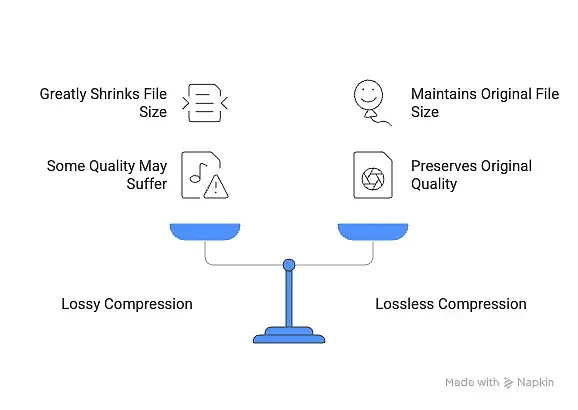
Lossy compression works by discarding data to make files smaller. JPEG is a prime example. This method can drastically reduce file size, but it can also lead to a slight drop in quality. Conversely, Lossless compression doesn’t lose any data, so the quality remains untouched. PNG falls into this category. If original quality is crucial, opting for Lossless is the way to go.
When Should You Use Lossy and When Lossless?
When you’re uploading images to a web page, if loading speed matters, consider using Lossy. For instance, thumbnails for blog posts can usually be Lossy without a problem. However, for images that will be printed, Lossless is more appropriate. The key is to choose the method that suits your purpose.
How Much Compression Is Possible Without Quality Loss?
If you want to minimize file size while keeping quality high, go for Lossless. However, this method has limitations too. Not all compression is 100% lossless. Typically, 80% quality is where a good balance between quality and size is found. I think that level works well.
Is Compression Always Necessary?
Honestly, you don’t need to compress every image. What’s important is to compress only what's necessary based on the situation. If you’re running a website with huge amounts of data, compression is beneficial, but for personal photo storage, it might not be needed at all.